Show automation
that listens to the stage.

Hardware that connects stage, console and software. Switches, sensors and MIDI gear fire your cues –
no computer in between. 

Coming soon: OSCpro GPIO8 · OSCpro MIDI Bridge

Coming soon

The hardware is coming.

Two devices for show control in theatre, touring and installations. Built one by one, in small numbers. We'll show more once the beta is running.

Blurred preview of the OSCpro GPIO8Beta test in preparation

OSCPROGPIO8

The stage calls the cue.

Contact closure in, OSC out: a footswitch, GO button, door contact or prop becomes a cue – on the lighting or sound desk, or in your show software. And the desk switches back: cue lights, relays, signals. A real GO button instead of a hacked USB keyboard.

  • 8 channels on XLR, each with GPI and GPO (contact closure in, switching out)
  • One network cable, power included (PoE)
  • Speaks OSC and network MIDI, display on the unit
Keep me posted
Blurred preview of the OSCpro MIDI BridgePrototype in the works

OSCPROMIDI Bridge

MIDI in, OSC out. And back.

A standalone MIDI to OSC converter: keyboards, playback rigs and anything with MIDI control gear that speaks OSC – and the other way round. No laptop, no translator software in between.

  • MIDI in and out: notes, CC and program change ↔ OSC
  • Works with any device that understands OSC or MIDI
  • Ready-made preset packs for individual consoles follow step by step as add-ons
Keep me posted

Also on the bench: OSCpro Footswitch and OSCpro Node. Features may still change before release.

Why OSCpro

Made in the show, for the show.

One cable. Power included.

Network and power over a single line. No wall warts on stage, no hunt for a socket.

Works with what you already have.

Any console or software that understands OSC, MSC or MIDI. Ready-made preset packs for individual consoles follow as add-ons.

No computer in between.

Set up once in the browser, then the devices run on their own. Show after show – and one less thing that can fail.

Free goodie · Max for Live

Already free today.

Your lighting console and Ableton Live, talking both ways –
via MIDI Show Control and OSC.

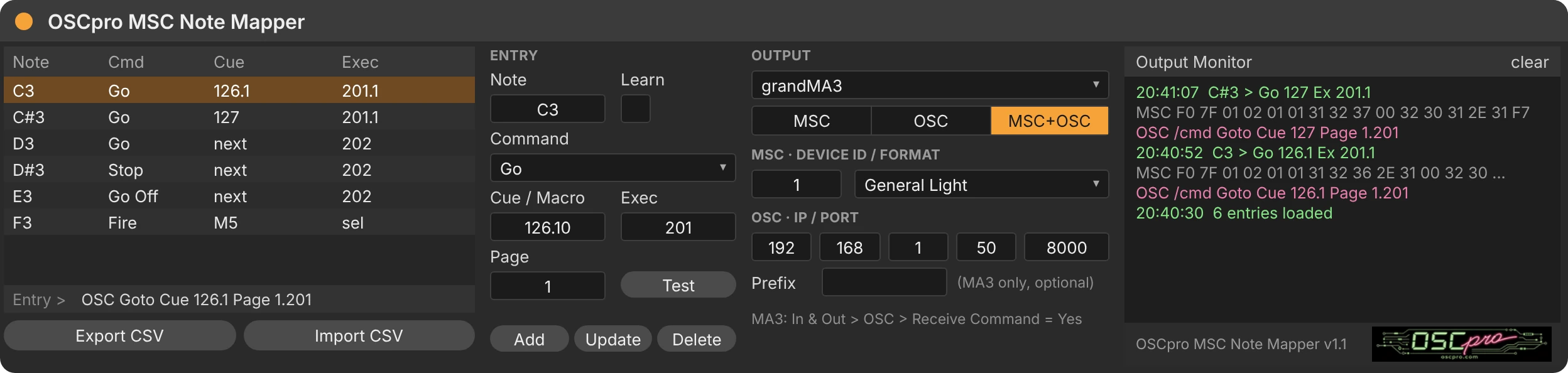
The OSCpro MSC Note Mapper in Ableton Live: mapping table, entry, output settings and output monitor
Ableton Live → Console

OSCPROMSC Note Mapper

Trigger lighting cues from Ableton – no timecode needed. Cues live as MIDI notes in your clips, so when the band stretches a section, the light follows. Sent via MSC, OSC or both. Profiles for grandMA3/2, ETC Eos, Hog 4 and ChamSys MagicQ. Your mappings are saved with the Live Set.

Download .amxd 332 KB

Version 1.1 · free · Live 11+ with Max for Live · macOS & Windows

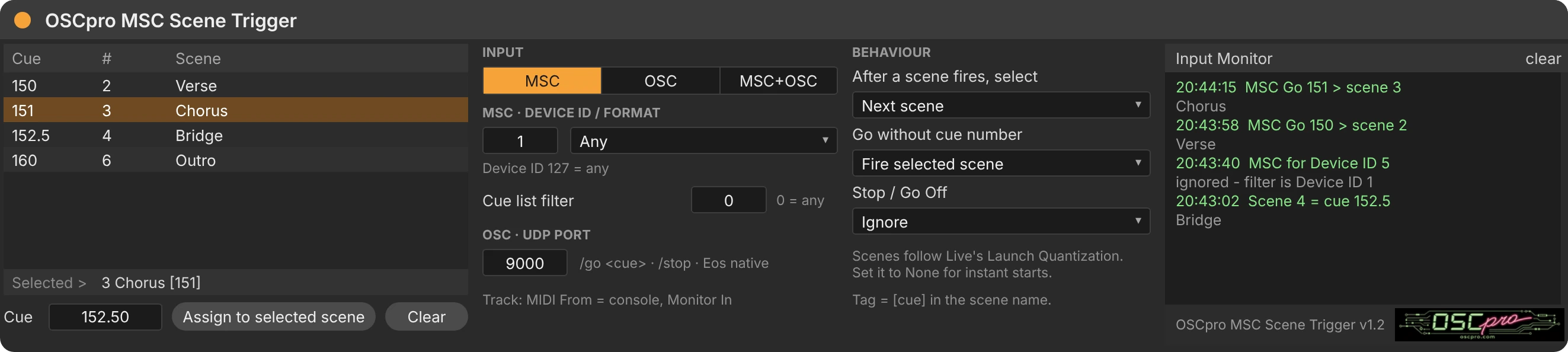
The OSCpro MSC Scene Trigger in Ableton Live: tagged scenes, input, behaviour and input monitor
Console → Ableton Live

OSCPROMSC Scene Trigger

Let the lighting desk run the show: a GO on the console fires the matching scene in Ableton, via MSC or OSC. Scenes are tagged with [cue] in their name in Session View – and are still found after you move or rename them.

Download .amxd 64 KB

Version 1.2 · free · Live 11+ with Max for Live · macOS & Windows

Which console speaks what
ConsoleNote Mapper · MSCNote Mapper · OSCScene Trigger
grandMA3all commandsall commands (/cmd)MSC · OSC via SendOSC
grandMA2all commands– no OSC inputMSC
ETC Eosall commandsGo to cue, Fire macroMSC · Eos cue events
Hog 4all except Fireall commandsMSC
ChamSys MagicQGo, Stop, ResumeGo, Pause, Release (PB 1–10)MSC
Generic MSCstandard MSC–MSC

Tested on grandMA3. The other profiles follow the manufacturers' documentation. Results from other consoles are welcome: mail@oscpro.com

The Scene Trigger starts a scene when the console calls a cue. The OSCpro GPIO8 lets the stage itself call the cue – with real switches, sensors and props.

To the hardware
Stay tuned

Be the first to know when the hardware ships.

Plugin updates and news about the upcoming OSCpro products – by email, only when there is something new.

Or follow along: Instagram @oscpro